MEPCO Bill Online Check 2026 — View & Download
Your MEPCO bill opens with either the 14-digit reference number or the 10-digit consumer ID printed on any earlier bill. Enter one below and the checker takes you straight to the official PITC bill page, where you can read the amount due, the due date and your recent payment record. No registration, no account and no CNIC are needed.
MEPCO Online Bill Check
Enter your Reference Number or Consumer ID to open the latest official PITC bill.
Need help finding your number? Find your reference number or consumer ID. Already opened your bill? Download or print a copy.
How to Check Your MEPCO Bill Online
Step 1 — Choose Reference No or Consumer ID
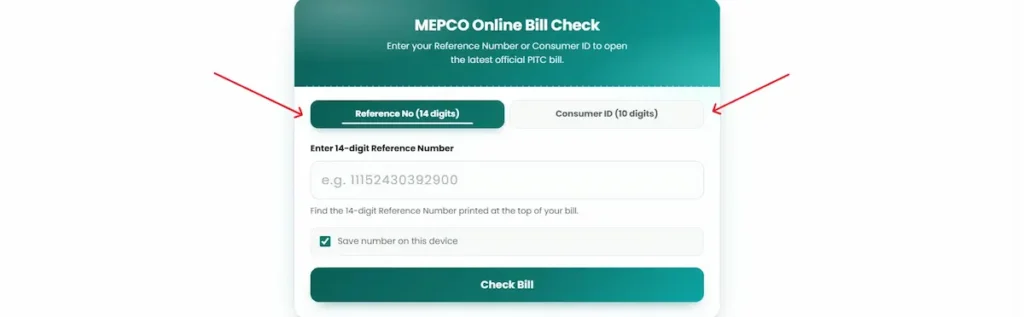
The checker opens on two tabs: Reference No (14 digits) and Consumer ID (10 digits). Reference No is selected by default, and it is the one most people use, because that number sits at the top of every printed bill.
Pick Consumer ID instead if you look up more than one connection. The consumer ID belongs to the connection rather than to a single billing cycle, so landlords, shopkeepers and anyone who does not always have the newest paper bill to hand usually find it the more dependable number to keep.
Step 2 — Type the number
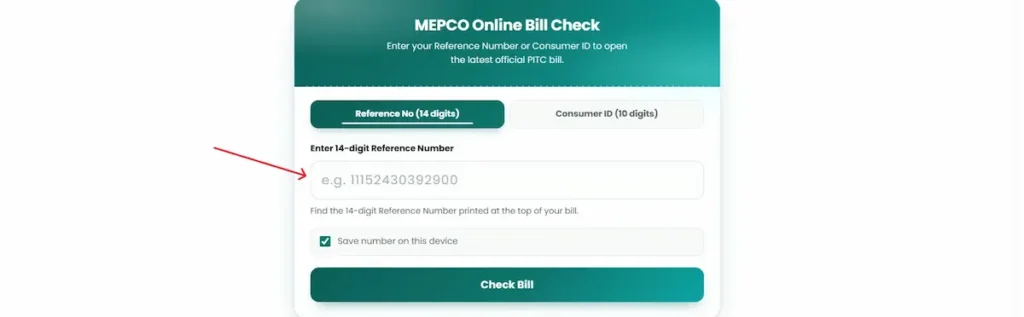
The field reads Enter 14-digit Reference Number, with an example format shown inside it. Type digits only. No spaces, no dashes, no commas. One stray character will stop the lookup from returning anything, and it is the most common reason a bill fails to load.
Tick Save number on this device if you would rather not retype it every month. The number stays in your own browser, on the device you are using.
Step 3 — Press Check Bill
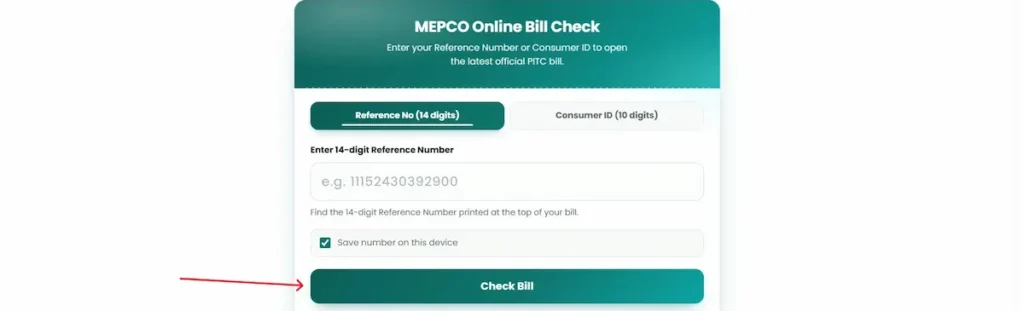
Check Bill opens your bill on the official PITC portal, the system that issues MEPCO bills. Nothing is copied, altered or stored here. You read the same bill MEPCO produced, on the source that produced it.
If nothing appears, your browser’s pop-up blocker has stopped the new tab from opening. Allow pop-ups for this page and press Check Bill again.
Download or Print a Duplicate MEPCO Bill
Once your bill opens on the official portal, press Ctrl + P on a desktop, or open the browser menu on a phone and choose Print or Share. Then select Save as PDF to keep a copy, or send it to a printer for a hard copy.
A duplicate bill is a reprint of the same bill, not a lesser version of it. Same reference number, same amount, same due date, same billing month. Bank branches, Easypaisa and JazzCash counters accept it for payment, and offices accept it for records.
Before you print one for the bank, an employer or a reimbursement claim, check the printout carefully. The reference number, the payable amount, the billing month and the due date all need to be legible. A page that cuts off at the margin or prints faint will be handed back to you.
What Your MEPCO Bill Shows
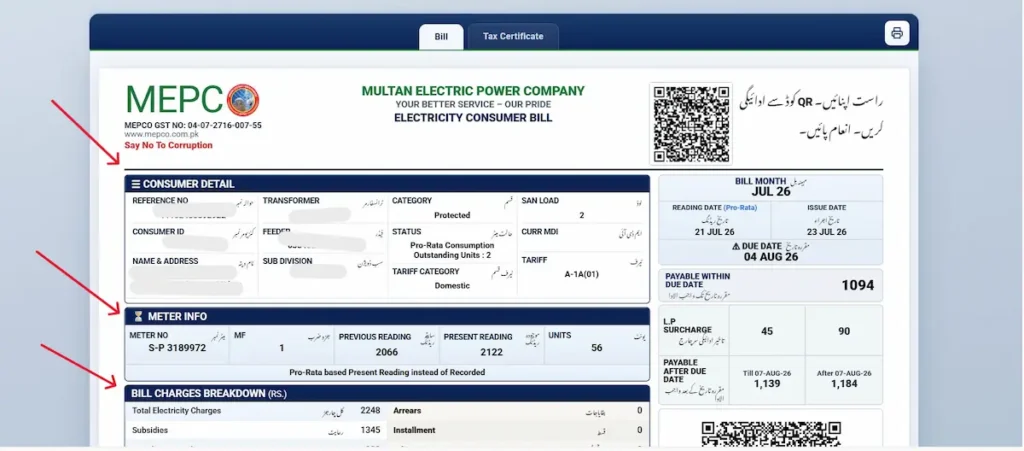
The page opens on two tabs, Bill and Tax Certificate. The bill itself runs top to bottom in blocks.
Consumer Detail carries your reference number, consumer ID, name and address, sub division, feeder, transformer, sanctioned load, and your tariff code with its category — on a protected domestic connection this reads A-1A(01), Domestic, Protected. Alongside sit the bill month, reading date, issue date and due date.
Meter Info shows the meter number, the multiplying factor, your previous and present readings, and the difference between them as units consumed. If the reading date is marked Pro-Rata, the present reading was worked out rather than recorded at the meter.
Bill Charges Breakdown lists total electricity charges, subsidies, arrears and any installment.
Read the payable figures carefully, because there are two: the amount payable within the due date and the higher amount payable after it. The L.P. Surcharge line shows what the delay costs.
One correction, because it is stated wrongly elsewhere. The payable amount is not the Total Electricity Charges line. On the bill shown here, charges of Rs 2,248 less subsidies of Rs 1,345 give Rs 903 before other charges; the illustrated bill shows Rs 1,094 payable within the due date. Pay the figure in the payable box and nothing else.
Bill History below gives twelve months with the units, the billed amount and the payment received against each.
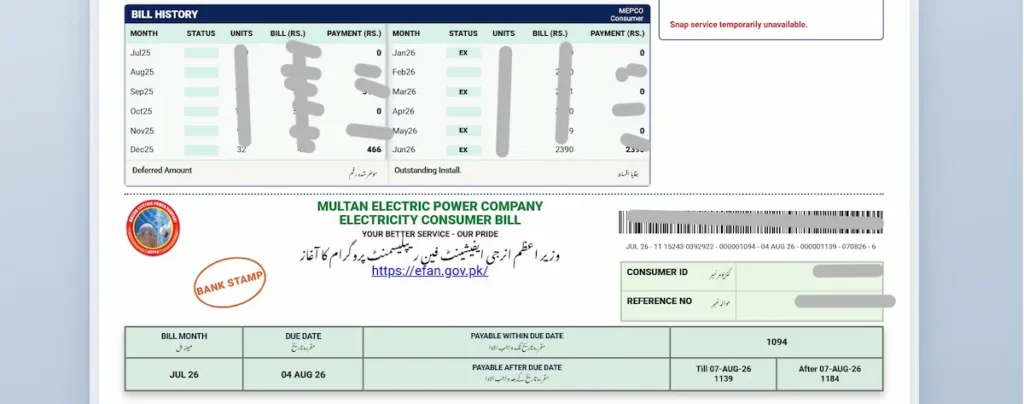
Where the Reference Number and Consumer ID Are Printed
Both numbers are printed in the upper section of your bill, close together.
The 14-digit reference number is the larger of the two and is labelled as the reference number. The 10-digit consumer ID sits near it and is shorter. Either one works in the checker above.
A third number causes most of the confusion. The meter number identifies the physical meter fitted at your property. It is not a billing identifier and will not return a bill, no matter which tab you use.
If you are deciding which number to write down and keep, choose the consumer ID. It stays attached to the connection, which makes it the safer one to save for a rental property, a shop or a second meter. Should a reference number you saved earlier stop returning a bill, switch to the Consumer ID tab and try that instead. In practice this clears up most failed lookups.
Lost Your Bill? How to Find Your Number Without It
Can you check a MEPCO bill by CNIC?
No. The official portal accepts only the 14-digit reference number or the 10-digit consumer ID, and there is no CNIC-based lookup anywhere in the system.
That limitation is worth knowing for a second reason. If a website asks for your CNIC before showing an electricity bill, treat it as suspect. A bill lookup does not need it, and your CNIC is the kind of information worth guarding. The same applies to any page asking for an OTP, a card number or a banking password to display a bill.
Five ways to recover your number
- Look in your mobile wallet or bank app. If the bill has been paid before through Easypaisa, JazzCash or a banking app, the transaction sitting in your payment history carries the reference number used at the time. This is the fastest route for most households and takes under a minute.
- Search your phone gallery and downloads folder. People photograph the bill or save it as a PDF at some point and forget. Search your downloads for recent PDFs, and scroll your gallery back to around the middle of any past month, when bills usually arrive.
- Ask whoever handled the connection before you. A landlord, the previous owner, or the family member who normally pays will often have an old copy or the number written down. For rented property, ask at the start of a tenancy rather than when a due date is approaching.
- Call the helpline with your CNIC ready. Ring 0800-63726 and give your CNIC along with the registered address of the connection. The agent can locate your reference number from MEPCO’s own records. This is where your CNIC is used properly: with MEPCO directly, never typed into a third-party form.
- Visit your Sub-Divisional Office. If the connection details themselves need sorting out, such as after a change of ownership or a long-vacant property, take your CNIC and proof of address to the Sub-Divisional Office that covers your area.
Once you have the number back, save it. Write it on paper somewhere you will find it, or tick Save number on this device in the checker above so next month is a single click.
Checking Old MEPCO Bills and Payment History
When your bill opens on the official portal, the last twelve months appear alongside the current month. Each row shows the billing month, the units consumed, the amount charged and whether that bill was paid or is still outstanding. There is no separate request, no login and no fee.
That record answers several situations people run into.
Before disputing a bill, check whether a payment you made has actually posted. Payments sometimes take a few days to appear against the account, and arrears shown in error usually resolve once the record updates.
Landlords and incoming tenants use the same twelve rows to confirm nothing was left unpaid at handover. It settles the question in seconds and avoids a dispute later.
Visa applications, loan files and business registrations often ask for utility records. The payment history gives you twelve months in one printable page.
The history is also the honest way to judge a high bill. Compare this month against the same month last year rather than against last month. A July bill will always look severe next to a March one.
Other Ways to Check Your MEPCO Bill
By SMS (8334)
Type PITC, a space, then your 14-digit reference number, and send it to 8334. Your bill details come back by return message.
No internet connection is needed, which matters during a long outage or anywhere the mobile signal carries voice and SMS but not much data.
MEPCO Smart app
MEPCO Smart is built by PITC, the same body that runs the official billing system, rather than by an outside developer.
Register with your details, tap the + icon, enter your 10-digit consumer ID and add the meter. The home screen then shows your latest bill, whether it is paid or pending, and your usage over time. More than one meter can be added to the same account, which suits landlords and anyone running a house and a shop.
By phone
Call 0800-63726 toll-free, or 118, if neither of the above works for you.
Each method suits a different moment. The web lookup above is the one to use when you need a printable copy or the full twelve-month record. SMS is faster when you only want the amount and the due date and have no data. The app is worth setting up if you track several connections month to month.
Every Charge on Your MEPCO Bill
Your bill is not units multiplied by a single rate. Several separate charges sit on top, most of them set by NEPRA or the federal government rather than by MEPCO. Here is what each line means.
FPA — Fuel Price Adjustment
A monthly adjustment for the difference between what fuel actually cost in generating electricity and the reference cost built into the base tariff. NEPRA sets it each month, and it can be positive or negative. FPA is the usual reason your bill moves even when your units barely change.
GST — General Sales Tax
Federal sales tax applied to your electricity charges. The rate has been revised more than once, and figures published on unofficial sites disagree with each other. Read the GST line on your own bill for the rate currently applied to your connection.
FC Surcharge — Financing Cost Surcharge
A per-unit charge that goes towards financing costs linked to the power sector’s circular debt. Lifeline domestic consumers, the lowest-usage households, are exempt from it.
TR Surcharge — Tariff Rationalisation Surcharge
This covers the gap between the tariff NEPRA determines and the lower rate the Government of Pakistan sets for consumers. On some bills it appears in full as the Inter-DISCO Tariff Rationalisation Surcharge.
QTR Tariff Adj / DMC
Quarterly Tariff Adjustment and Distribution Margin Charges. Applied to monthly bills during the notified adjustment period, with applicability depending on that period and consumer eligibility, which is why it can appear on one bill and not the next. See NEPRA’s 4 September 2026 quarterly adjustment decision for the applicable period and exclusions.
Income Tax
Withheld at source from the bill. The rate depends on your consumer category and, for commercial and industrial connections, on filer status with the FBR.
Further Tax and Extra Tax
Both apply to commercial and industrial connections only. Further Tax is charged under section 3(1A) of the Sales Tax Act 1990 and Extra Tax under SRO 1222(I)/2021; both apply where the consumer has either not obtained a sales tax registration number or holds one but is not on the FBR’s Active Taxpayer List. Neither appears on a domestic bill.
LPS — Late Payment Surcharge
The difference between the two payment figures on your bill. Pay within the due date and you pay the lower one. Pay after, and the higher figure applies.
Deferred Amount
Where MEPCO has approved a deferral, the postponed sum shifts to next month’s bill as a separate line rather than attracting an immediate late fee.
Two charges that no longer apply
PTV Licence Fee. The Prime Minister announced the removal of the Rs 35 monthly PTV fee on 29 June 2025, at the launch of the Apna Meter Apni Reading app. It should not appear on current bills.
Electricity Duty. The federal government announced the abolition of Electricity Duty on electricity bills with effect from July 2025. The Federal Minister for Energy wrote to all provincial chief ministers asking them to discontinue collection from 1 July 2025. It was a provincial levy under Section 13 of the West Pakistan Finance Act 1964, previously charged at around 1.5% for domestic and commercial connections and 1% for industrial.
Electricity Duty is a provincial charge and the federal step was a request to the provinces. If either line still shows on your current bill, raise it through CCMS with the bill attached rather than assuming it is correct.
Why Your MEPCO Bill Is Higher Than Last Month
Four causes account for most sudden increases. Work through them in this order.
- Seasonal load. Air conditioning, ceiling fans and water pumps through a South Punjab summer move a household’s units far more than people expect. Before assuming an error, open your twelve-month history and compare this month against the same month last year. Comparing July to June will always look alarming and tells you nothing.
- Crossing the 200-unit threshold. Domestic consumers who stay at or below 200 units a month fall into the protected category and pay subsidised rates. Go past 200 units and you move to non-protected rates, and that status generally holds for the following six months even if your usage drops back down.
This is the mechanism behind most severe bill shock, and it has a practical consequence worth understanding. If you normally sit just above the threshold, the saving from cutting back to just below it is far larger than the cost of those few units, because it protects your rate for months rather than one bill. Run 195 units and then 205 through the MEPCO bill calculator and the gap between the two figures is what those ten units actually cost you.
- Pro-rata billing. When a billing cycle is not a full month, the units are apportioned across it. This happens after a new connection, a meter change, or when the reading is taken on a different date than usual. A shortened or extended cycle can push a household into a higher band without its actual consumption having changed. This was one of the specific problems the Apna Meter Apni Reading app was introduced to address, since pro-rata calculation was moving consumers out of the protected category.
- A misread meter. Before paying anything, walk to your meter and photograph the display so the digits are clearly readable. Compare it against the current reading printed on your bill. If the two do not match, you have a complaint to file, not a bill to pay.
On peak hours: if you have a standard meter, the time of day does not change your per-unit rate, though shifting heavy appliances away from the evening does not by itself reduce your total units. On a TOU or TOD meter it changes the rate directly, and moving your washing, ironing and pump use outside peak hours has a measurable effect.
Wrong Bill or Wrong Reading? How to Get It Corrected
Register the complaint on CCMS
Complaints go through CCMS, the Customer Complaint Management System run by PITC at ccms.pitc.com.pk. Enter your 14-digit reference number and mobile number, confirm the OTP sent to that number, choose the billing complaint category, enter the correct reading taken from your physical meter, and submit. No account is needed. Registration also accepts a CNIC or mobile number, and you can track the complaint afterwards using your reference number.
Have these ready before you start, because the form moves faster than you can gather them: your reference number, consumer ID, the mobile number you want the OTP on, the billing month in dispute, a clear photograph of your meter with the digits readable, the payment receipt if you have already paid, and one plain sentence describing what is wrong.
Note down the ticket number when it is issued. Following up without it is difficult.
If there is no response
Under NEPRA’s consumer protection rules, billing complaints are to be addressed within the deadline applicable to the complaint type: seven days from receipt for reading or calculation errors, and 30 days for tariff-change complaints.
If that passes with nothing, go to your Circle Office in person with the ticket number and your paperwork. Beyond that, NEPRA’s consumer services division takes complaints directly. The final step is the Federal Mohtasib at mohtasib.gov.pk, which handles complaints against government bodies free of charge, online, with no lawyer needed.
Detection bills
A detection bill is issued when inspectors find evidence of electricity theft or meter tampering, and it covers estimated unbilled consumption for the period, arriving separately from your regular monthly bill.
It is disputed through the same CCMS route, and your meter photograph together with your earlier bills showing normal consumption are the evidence that matters.
How to Pay Your MEPCO Bill Safely
Payment goes through JazzCash, Easypaisa, SadaPay, NayaPay, or the bill payment section inside banking apps including HBL, UBL, MCB, Meezan and Allied. Bank branches, ATMs and Pakistan Post counters accept the printed bill.
The flow is the same everywhere: bill payment, then electricity, then MEPCO, enter your reference number, confirm the amount, pay, save the receipt.
Before you confirm, check three things on screen. The company shown is MEPCO. The reference number matches the one on your bill. The amount and due date match as well. Thirty seconds spent here prevents a payment landing against someone else’s connection, which takes considerably longer to unwind.
Save the receipt rather than relying on the app notification. Payment status can take a few days to appear against your account, and the receipt is what settles the question in the meantime.
One warning worth taking seriously. Never send money to an individual’s personal Easypaisa, JazzCash or bank account for anything connected to your electricity: not a bill payment, not a meter correction fee, not a fine cancellation, not a new connection payment, not a bill adjustment. Payments belong in recognised bill payment channels only.
No genuine MEPCO process asks for an OTP, a card number or a banking password in order to correct a bill. A call or message requesting any of those is not from MEPCO.
Can’t Pay by the Due Date?
MEPCO has two formal routes for consumers who cannot pay in full on time: a short extension of the due date, or splitting the bill into instalments.
Which officer approves the request depends on how large the bill is. Smaller amounts are handled by the Assistant Manager Operation, moving up through the Deputy Manager Operation and the Manager Operation, then to the Chief Engineer, with the largest cases going to the Chief Executive Officer.
Rather than guessing which band you fall into, take your latest bill and your CNIC to the Sub-Divisional Office covering your area and ask which officer handles an amount like yours. Staff there will point you to the right desk, and many requests are settled during the same visit.
Timing matters more than anything else here. Make the request before the due date passes. Once it does, the late payment surcharge applies and the higher figure on your bill becomes what you owe.
Where MEPCO Supplies Electricity
MEPCO covers thirteen districts of southern Punjab: Multan, Bahawalpur, Rahim Yar Khan, Dera Ghazi Khan, Sahiwal, Khanewal, Vehari, Muzaffargarh, Lodhran, Bahawalnagar, Pakpattan, Rajanpur and Layyah.
The lookup above works the same way across all of them. There is no separate page or process for Multan as against Bahawalpur or Layyah, and it makes no difference whether the connection is a house, a shop, an office or a rented property.
For scale: MEPCO supplies roughly 8.76 million consumers, which makes it Pakistan’s largest distribution company by customer base, across a network of more than 82,000 kilometres of distribution lines and 134 grid stations as reported in MEPCO’s submission reproduced in NEPRA’s 7 January 2026 determination.
Is a MEPCO bill the same as a WAPDA bill?
MEPCO was separated from WAPDA during the 1998 unbundling of Pakistan’s power sector. It now operates under the Ministry of Energy, Power Division, and is regulated by NEPRA, while WAPDA handles hydel generation and water resources. If you are searching for a “WAPDA bill” for a connection anywhere in these thirteen districts, the bill you want is your MEPCO bill.
Is It Safe to Check Your MEPCO Bill Here?
A fair question, and one worth answering directly.
- This is not an official MEPCO website. It is independent and has no affiliation with MEPCO, PITC, WAPDA, NEPRA or the Government of Pakistan.
- The bill you see comes from the official source. Pressing Check Bill opens the official PITC bill page. Nothing is reproduced here, nothing is modified, and no bill is stored on this site. You read the same bill MEPCO issued, on the system that issued it.
- What a bill lookup never needs. Your reference number or consumer ID is enough. It does not require your CNIC, an OTP, a card number, a banking password or an account with anyone. If a site asks for any of those before showing a bill, close it.
- What is kept. Only the number you choose to save with the checkbox, and it stays in your own browser on your own device.
If anything on your bill needs correcting, that goes through MEPCO and CCMS directly. No third-party website can change what is on it.
FAQs
Can I check my MEPCO bill without a reference number?
Yes. Select Consumer ID and enter your 10-digit consumer ID.
Can I check a MEPCO bill by CNIC?
No. The official portal supports only the 14-digit reference number or the 10-digit consumer ID. If you have lost both, call 0800-63726 with your CNIC and MEPCO staff can retrieve the number.
Why does “Bill Not Found” appear?
Usually one of three things: spaces or dashes typed into the number, a 10-digit consumer ID entered on the Reference No tab, or the current month’s bill not being generated yet.
Is a duplicate bill accepted for payment?
Yes. A duplicate carries the same reference number, amount and due date as the original. See how to download or print it.
How do I confirm my bill was paid?
The twelve-month history on the official bill page marks each month as paid or outstanding. Your wallet or bank app receipt confirms it independently if the record has not updated yet.
Can I pay after the due date?
Yes, at the higher of the two figures printed on your bill, which includes the late payment surcharge. Repeated non-payment can eventually lead to disconnection.
How far back does the bill history go?
Twelve months, shown automatically alongside the current bill. For records older than that, ask at your Sub-Divisional Office.
What is a detection bill?
A separate charge raised when inspectors find evidence of theft or meter tampering, covering estimated unbilled units for the period. It arrives apart from your monthly bill and is disputed through CCMS.
Does this site charge anything?
No. Checking, viewing and printing your bill costs nothing, and there is no registration or subscription.
Where does the bill actually open?
On the official PITC portal. Press Check Bill to open your bill there.